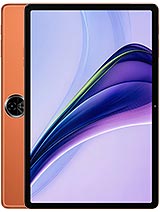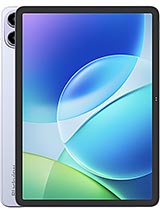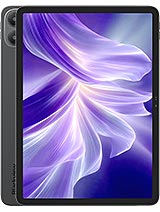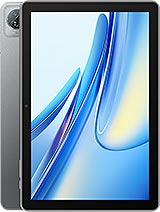
Announced 2023, September
Blackview Tab 70 WiFi specifications
The Blackview Tab 70 WiFi was announced in 2023, September. It has a 10.1-inch IPS LCD display, 3 GB RAM, 6,580 mAh battery, 5 MP main camera. Every value below comes from one call to the Device Specs API and is returned as typed JSON, ready for comparison engines, catalogs and AI agents.
Normalized specification sheet
Display
Size10.1 inches
PanelIPS LCD
Resolution (raw)IPS LCD
Platform
CPUQuad-core
Cores4
OSAndroid 13, DokeOS_P 3.0
Memory and storage
RAM options3 GB
Storage options64 GB
Storage techeMMC 5.1
microSD slotYes
Configurations (raw)64GB 3GB RAM
Battery and charging
Capacity6580 mAh
Wired charging10 W
Wireless chargingNo
Charging (raw)10W wired
Cameras
Rear lenses1
Max rear resolution5 MP
Rear camera (raw)5 MP
Rear videoYes
Front lenses1
Front camera (raw)2 MP
Front videoYes
Body
Dimensions246.5 × 163 × 9.9 mm
Weight5 g
ColoursSpace Grey, Twilight Blue
Sound
Stereo speakersYes
3.5 mm jackNo
Connectivity
NetworkNo cellular connectivity
Wi-FiWi-Fi 802.11 a/b/g/n/ac/6, dual-band
Bluetooth5, A2DP, LE
PositioningNo
NFCNo
InfraredNo
FM radioNo
USBUSB Type-C 2.0
USB OTGYes
Benchmarks and EU label
EU energy classClass D
EU battery endurance112.1 h
EU repairabilityClass B
EU free-fall classClass C (147 falls)
Identity and pricing
Announced2023, September
StatusAvailable. Released 2023, September
GET /api/values/clean/getspecs/Blackview/Tab%2070%20WiFi200 OK
{
"id": 457906,
"manufacturer": "Blackview",
"model": "Tab 70 WiFi",
"network": "No cellular connectivity",
"announceDate": "2023, September",
"status": "Available. Released 2023, September",
"chipset": "",
"androidVersion": "Android 13, DokeOS_P 3.0",
"battery_raw": "6580 mAh",
"cpu_raw": "Quad-core",
"displayResolution_raw": "IPS LCD",
"displaySize_raw": "10.1 inches, 295.8 cm<sup>2</sup> (~73.6% screen-to-body ratio)",
"displayType_raw": "IPS LCD",
"gpu": "",
"internal_raw": "64GB 3GB RAM",
"mainCameraFeatures": "LED flash",
"mainCameraSpecs_raw": "5 MP",
"mainVideoSpecs": "Yes",
"selfieCameraFeatures": "",
"selfieCameraSpecs_raw": "2 MP",
"selfieVideoSpecs": "Yes",
"sensors": "",
"charging_raw": "10W wired",
"price_usd": 0,
"price_eur": 0,
"price_gbp": 0,
"imageUrl": "https://fdn2.gsmarena.com/vv/bigpic/blackview-tab-70-wifi.jpg",
"colors": [
"Space Grey",
"Twilight Blue"
],
"variants": [],
"normalized_specs": {
"id": 457911,
"display": {
"id": 457911,
"size_inches": 10.1,
"panel_type": "IPS LCD",
"refresh_rate_hz": 0,
"peak_brightness_nits": 0,
"protection_type": ""
},
"processor": {
"id": 457911,
"total_cores": 4,
"max_clock_speed_ghz": 0
},
"memory_options": {
"id": 457911,
"available_ram_gb": [
3
],
"available_storage_gb": [
64
],
"has_card_slot": true,
"storage_technology": "eMMC 5.1"
},
"battery_and_charging": {
"id": 457911,
"capacities_mah": [
6580
],
"max_wired_charging_w": 10,
"has_wireless_charging": false
},
"cameras": {
"id": 457911,
"main_lenses_count": 1,
"max_main_resolution_mp": 5,
"selfie_lenses_count": 1
},
"physical": {
"id": 457911,
"height_mm": 246.5,
"width_mm": 163,
"thickness_mm": 9.9,
"weight_g": 5,
"build_materials": [],
"sim_options": [],
"ip_rating": "",
"is_water_resistant": false
},
"sound": {
"id": 457911,
"has_stereo_speakers": true,
"has_jack_35mm": false,
"audio_quality_features": []
},
"connectivity": {
"id": 457911,
"wlan_features": [
"Wi-Fi 802.11 a/b/g/n/ac/6",
"dual-band"
],
"bluetooth_version": 5,
"bluetooth_features": [
"A2DP",
"LE"
],
"positioning_tech": [
"No"
],
"has_nfc": false,
"has_infrared": false,
"has_radio": false,
"usb_type": "USB Type-C 2.0",
"usb_has_otg": true
},
"benchmarks": {
"id": 457911,
"antutu_score": "",
"geekbench_score": "",
"measured_display_brightness_nits": 0,
"measured_loudspeaker_lufs": 0,
"measured_battery_active_use_hours": 0
},
"eu_label": {
"id": 457911,
"energy_class": "Class D",
"battery_endurance": "112:06h endurance, 800 cycles",
"battery_endurance_hours": 112.1,
"free_fall_class": "Class C (147 falls)",
"repairability_class": "Class B"
}
}
}Reproduce this response
GET/api/values/clean/getspecs/Blackview/Tab%2070%20WiFi
cURL
curl 'https://gsmarenaparser.p.rapidapi.com/api/values/clean/getspecs/Blackview/Tab%2070%20WiFi' \ -H 'x-rapidapi-key: YOUR_RAPIDAPI_KEY' \ -H 'x-rapidapi-host: gsmarenaparser.p.rapidapi.com'SDK equivalents (Python, TypeScript, C#)
Python
from devicespecs import DeviceSpecsClientclient = DeviceSpecsClient("YOUR_RAPIDAPI_KEY")device = client.get_specs("Blackview", "Tab 70 WiFi")print(device["normalized_specs"]["display"])TypeScript
import { DeviceSpecsClient } from "@granturismo/devicespecs";const client = new DeviceSpecsClient("YOUR_RAPIDAPI_KEY");const device = await client.getSpecs("Blackview", "Tab 70 WiFi");console.log(device?.normalized_specs?.display);C#
using var client = new DeviceSpecsClient("YOUR_RAPIDAPI_KEY");var device = await client.GetSpecsAsync("Blackview", "Tab 70 WiFi");Console.WriteLine(device?.NormalizedSpecs?.Display?.SizeInches);The JSON above is the live API response for this device, unmodified.
Get a free API key